SAP AI Integration: Connect Claude to SAP in Minutes
Add AI to SAP without migrating to S/4HANA. Connect Claude to your existing SAP data, including ECC, via MCP in just three steps. No credit card required.
By Artificial Wit Team
By Artificial Wit Team. Last updated: July 28, 2026.
SAP AI integration means giving Claude, or any AI model, natural-language, read-and-act access to your existing SAP data through MCP, without migrating to S/4HANA or waiting for SAP's own Joule rollout. A pre-built connector does this in three steps, against the SAP system you already run, including ECC.
You've probably heard the other announcement by now, too. At Sapphire 2026, SAP and Anthropic confirmed a formal partnership: Claude embedded directly into SAP's Business AI Platform through Joule agents, running across S/4HANA, SuccessFactors, and Ariba. If you're evaluating AI on SAP data right now, that news is impossible to ignore. It shouldn't be.
But it also isn't the whole picture. That path assumes you're already on or moving toward SAP's own Business Technology Platform (BTP) and S/4HANA. A lot of SAP shops aren't, and don't want to be told AI access has to wait for a migration.
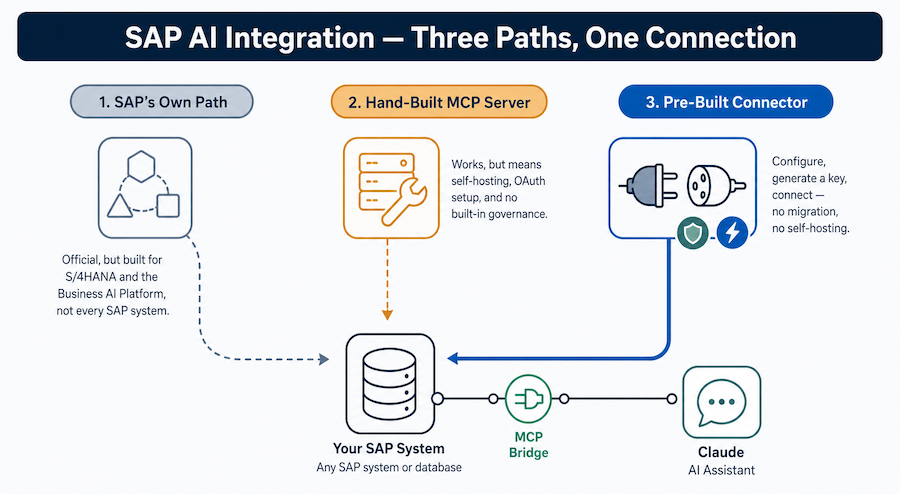
This article lays out all three real paths: SAP's own official route, building your own MCP server by hand, and a pre-built connector, so you can see exactly where each one fits before you commit engineering time to any of them.
- SAP and Anthropic's Sapphire 2026 partnership brings Claude into SAP's own Business AI Platform, but that path is built around BTP and S/4HANA, not ECC.
- SAP ECC mainstream maintenance ends December 31, 2027, confirmed final with no further extensions, and more than 60% of SAP customers haven't started their S/4HANA migration yet.
- A pre-built SAP connector lets Claude query SAP data, including ECC, through MCP without waiting on that migration.
- Setup is three steps: configure the connector, authenticate with an API key or OAuth using your own login, connect an MCP client.
- Role-based access control mirrors whatever permissions your SAP users already have, so the AI never sees more than the requesting user is allowed to.
What "Connect Claude to SAP" Actually Means
Connecting Claude to SAP means wrapping specific SAP operations, like an order status lookup or a master data check, in a standard interface an AI model can call safely, instead of hand-coding a one-off integration for a single use case.
That standard interface is the Model Context Protocol (MCP), an open way for AI models to discover and call tools with defined inputs, outputs, and authentication. Once an operation exists as an MCP tool, Claude can call it directly, the same way it would call any other tool. The response comes back structured instead of scraped from a screen.
This is a different question from "should we migrate to S/4HANA." MCP doesn't touch your underlying SAP system at all. It sits alongside it, calling the same APIs a human user or an existing integration already calls, just with an AI model on the other end instead of a person clicking through a transaction screen.
Not sure where MCP fits in your stack yet? See how Artificial Wit's MCP server works →
SAP's Own Path: Joule, MCP, and the Business AI Platform
SAP's announcement at Sapphire 2026 was real, and worth taking seriously. According to the SAP News Center, SAP and Anthropic are bringing Claude into SAP's Business AI Platform as a primary reasoning engine, with Joule agents using MCP to reach across S/4HANA, SuccessFactors, and Ariba. For SAP shops already committed to BTP and the S/4HANA roadmap, this is the most natively integrated path available, built and supported by SAP itself.
The constraint is in the assumption underneath it. Joule's MCP access is scoped to SAP's own tenancy and, per SAP's current messaging, to forward-looking S/4HANA-track deployments. If your organization runs ECC and isn't on BTP yet, this path isn't available to you today. It won't be until a migration project puts you there.
That's the gap a lot of evaluators miss on first read: "SAP now supports Claude via MCP" doesn't mean every SAP system supports Claude via MCP. It means SAP's newest platform does.
Here's how the three real paths compare side by side:
| Path | Works with ECC today? | Requires BTP/S/4HANA? | Governance & RBAC | Setup effort |
|---|---|---|---|---|
| SAP's own Joule (Business AI Platform) | No | Yes | Native to SAP tenancy | None, built-in once on the platform |
| Hand-built MCP server (DIY) | Yes | No | Not included, must be built | Weeks (OAuth, schemas, hosting) |
| Pre-built SAP connector | Yes | No | Mirrors existing SAP permissions | Minutes (configure, key, connect) |
Why SAP AI Integration Needs a Connector Layer, Not Just Joule
The 2027 ECC Deadline Doesn't Have to Mean "Migrate First, AI Later"
The case for AI for SAP without S/4HANA migration starts with a hard deadline. SAP ECC 6.0's mainstream maintenance ends December 31, 2027, and RiminiStreet confirms SAP has ruled out any further extension. Extended maintenance through 2030 exists, but only for EHP 6-8 customers, and it comes at an added cost. That deadline is real and getting closer, which is exactly why so many teams are asking about SAP AI integration right now.
Here's the part worth separating out clearly: the maintenance deadline is about support for your ERP core. It isn't a deadline on when you're allowed to get AI access to your SAP data. Those are two different projects running on two different timelines. Treating them as one forces a migration decision you don't need to make yet, just to answer a much smaller question: can Claude read our exception queue?
According to SAVIC Technologies, more than 60% of SAP customers hadn't started their S/4HANA migration as of 2026. That's not a small group of laggards. It's the majority of the installed base, and most of them still want AI-powered access to the SAP data they're running today, not the SAP data they might be running after a multi-year migration completes.
DIY MCP Tutorials Solve "Can I," Not "Should My Whole Team"
The technical community has already proven this is possible. Guides like SAP Community's walkthrough on connecting Claude to SAP Datasphere via MCP and a second one connecting Claude to an ABAP system directly are genuinely thorough, and they work.
What they don't solve is what happens after one engineer gets it running on a laptop. There's no built-in role-based access control tied to your existing SAP user permissions. No audit log of which model called which SAP endpoint with what arguments. No plan for what happens when that engineer moves teams and the self-hosted MCP server they built becomes an unowned dependency.
These guides answer "can I connect Claude to SAP." They don't answer "should this be how our whole organization does it."
Weighing a self-hosted build against a pre-built connector? Read how AI-enabling a legacy ERP without re-platforming actually works →
The 3-Step Path to SAP AI Integration
A SAP MCP server, the pre-built connector configured in the steps below, collapses the DIY build into three steps, without requiring BTP, S/4HANA, or a custom wrapper around SAP's APIs.
- Configure the SAP connector. Point it at your existing SAP APIs, the ones already exposing the operations you want AI-accessible, whether that's ECC, S/4HANA, or Datasphere.
- Authenticate your client. Generate an API key so calls are tied to a specific, revocable credential, or connect via OAuth using your own Artificial Wit login instead.
- Connect your MCP client. Claude Desktop, Cursor, ChatGPT, Gemini, or any MCP-compatible client can now call your SAP tools directly.
That's the same configure-authorize-connect pattern behind Artificial Wit's broader legacy system AI-enablement approach, applied specifically to SAP. Most teams go from signup to a working SAP tool call in minutes, not the weeks a hand-built MCP server typically takes once you account for OAuth, schema definitions, and testing.
What You Can Ask Once It's Connected
Once SAP data is exposed as MCP tools, the questions people actually ask look less like "generate a report" and more like the small, specific lookups that used to mean switching screens or filing a ticket with IT.
Daniel Ochoa manages accounts receivable for a mid-market industrial parts distributor still running SAP ECC. Every Monday, he used to spend the first hour of his week manually checking a dozen customer accounts for overdue exception flags, logging into SAP, navigating to the right transaction, and cross-referencing against a spreadsheet he kept separately. After his team connected Claude to their SAP data through an MCP connector, that hour became a two-minute conversation: "Which accounts have open exception flags older than 5 business days?" Claude pulls the answer directly from SAP, with the account numbers and flag dates attached, and Daniel spends the rest of that hour actually working the exceptions instead of finding them.
That's a representative pattern, not a documented case study, but it maps to the kinds of questions this connector layer is built to answer:
- Exception queue lookups: "Show me open delivery exceptions flagged this week."
- Master data checks: "What's the current credit limit and payment terms for customer 4471?"
- Open order status: "Which purchase orders from vendor 8823 are still pending goods receipt?"
Each of these previously meant opening SAP, navigating to a specific transaction code, and reading the result manually. Through MCP, the same data comes back as a direct answer inside whatever AI client the person is already using.
Curious what this looks like connected to your own SAP instance? Start free, no credit card required →
Governance: The Same Access Rules Your SAP Users Already Have
The first objection a security reviewer raises about AI access to ERP data is usually some version of "what stops the model from seeing everything." The answer has to be specific, not reassuring.
Role-based access control applies to the MCP connector the same way it applies to any other SAP integration: the AI only returns data the requesting user's existing SAP permissions already allow. A user who can't see a particular plant's inventory in SAP directly can't see it through Claude either. The permission check happens against the same underlying access model, not a separate AI-specific ruleset someone has to maintain in parallel.
For Enterprise deployments, that governance extends further: audit logs record which tool was called, by which user, with what arguments, giving IT and compliance teams the same visibility into AI-driven SAP queries that they already have into direct SAP access. None of this requires trusting a vendor's claim. It's the same access control and audit infrastructure your team already relies on for SAP, Oracle, Salesforce, and NetSuite integrations, extended to cover AI clients instead of stopping short of them. Read more about how the governance model works if a compliance review is part of your evaluation.
Frequently Asked Questions
Do I need to migrate to S/4HANA to connect Claude to SAP?
No. A pre-built SAP connector lets you add AI to SAP without migration: it wraps the APIs your current SAP system already exposes, whether that's ECC, S/4HANA, or Datasphere. Migration status doesn't gate AI access.
Is this the same as SAP's own Joule AI assistant?
No. Joule is SAP's native assistant, built into the Business AI Platform and scoped to BTP/S/4HANA-track tenancies. A pre-built connector is a separate, platform-agnostic layer that works against your existing SAP APIs without requiring you to be on BTP.
Does this work with SAP ECC, not just S/4HANA?
Yes. Since the connector points at APIs your SAP system already exposes rather than requiring a specific SAP platform version, it works with ECC deployments, including ones without any near-term S/4HANA migration plan.
Can I use ChatGPT or Gemini instead of Claude with the same SAP connector?
Yes. MCP is model-agnostic. The same connector and API key work with any MCP-compatible client, so switching or mixing AI models doesn't mean rebuilding the SAP integration.
Does this require building or hosting my own MCP server?
No. A pre-built connector replaces the self-hosting, OAuth setup, and protocol handling that a DIY MCP build otherwise requires. Configuration happens through the connector's own setup flow.
What happens to SAP data access after the 2027 ECC maintenance deadline?
The maintenance deadline affects SAP's own support commitment for ECC, not AI access to it. A connector built against your current SAP APIs continues to work through your organization's own migration timeline, whenever that happens.
SAP AI Integration: The Bottom Line
SAP AI integration doesn't have to mean waiting for SAP's own Joule rollout. It doesn't have to mean an engineer hand-building and maintaining a custom MCP server either. SAP and Anthropic's Sapphire 2026 partnership is real progress, but it's built for BTP and S/4HANA-track deployments, leaving the majority of SAP customers, the 60%+ still running ECC without a completed migration, without an official path.
A pre-built SAP connector closes that gap: configure it against the SAP APIs you already have, authenticate with an API key or OAuth using your own login, and connect any MCP client, with role-based access control that mirrors your existing SAP permissions rather than introducing a separate governance model to maintain. You get natural language queries on SAP data on your own migration timeline, not SAP's.
Ready to connect Claude to your own SAP data? Sign up free, no credit card required, and configure your first SAP connector in minutes.
Related reading
Ready to put this into practice?
Talk to us about your stack