Run your pipeline where the
rest of your business already is
Configurable pipelines, a drag-and-drop deal board, and forecasting that keeps itself honest — in the same tenant as your AI assistant and your procurement and asset records. One login, no integration project.
Free plan available. No credit card required.
A CRM is only as good as what it can see
Most sales tools are excellent at sales and blind to everything else. If your support tickets, purchase history and asset records live in another system, joining them to the pipeline becomes an integration project — one that gets rebuilt every time a tool changes.
This CRM starts from the other end. It shares a tenant with AI Assistant and Asset Management, so the account, the order that was raised against it, and the ticket that followed are already in one place — and the same AI layer can reach all three.
The pipeline essentials, without the sprawl
Pipelines you configure
Define your own pipelines and the stages inside them, in the order your sales process actually runs. Not someone else's idea of how deals should progress.
Drag-and-drop deal board
Move a deal across the board and its status, probability and history update themselves. You change the stage; the system keeps the bookkeeping consistent.
Stage history, kept automatically
Every stage change is recorded with where it moved from, where it went, and who moved it — so pipeline reviews start from a record rather than a recollection.
Leads with source and status
Track where leads came from and where they've got to, then see both broken down on the dashboard. Lists support server-side search, filtering, sorting and paging, so volume doesn't slow them down.
Accounts, contacts and a 360 view
Company and contact records, with an account view that pulls the whole relationship together in one place. Deals can carry multiple contacts.
Multi-currency
Record deals in the currency they're sold in and report on a converted base amount, so a single forecast number still means something across regions.
Monday morning, answered
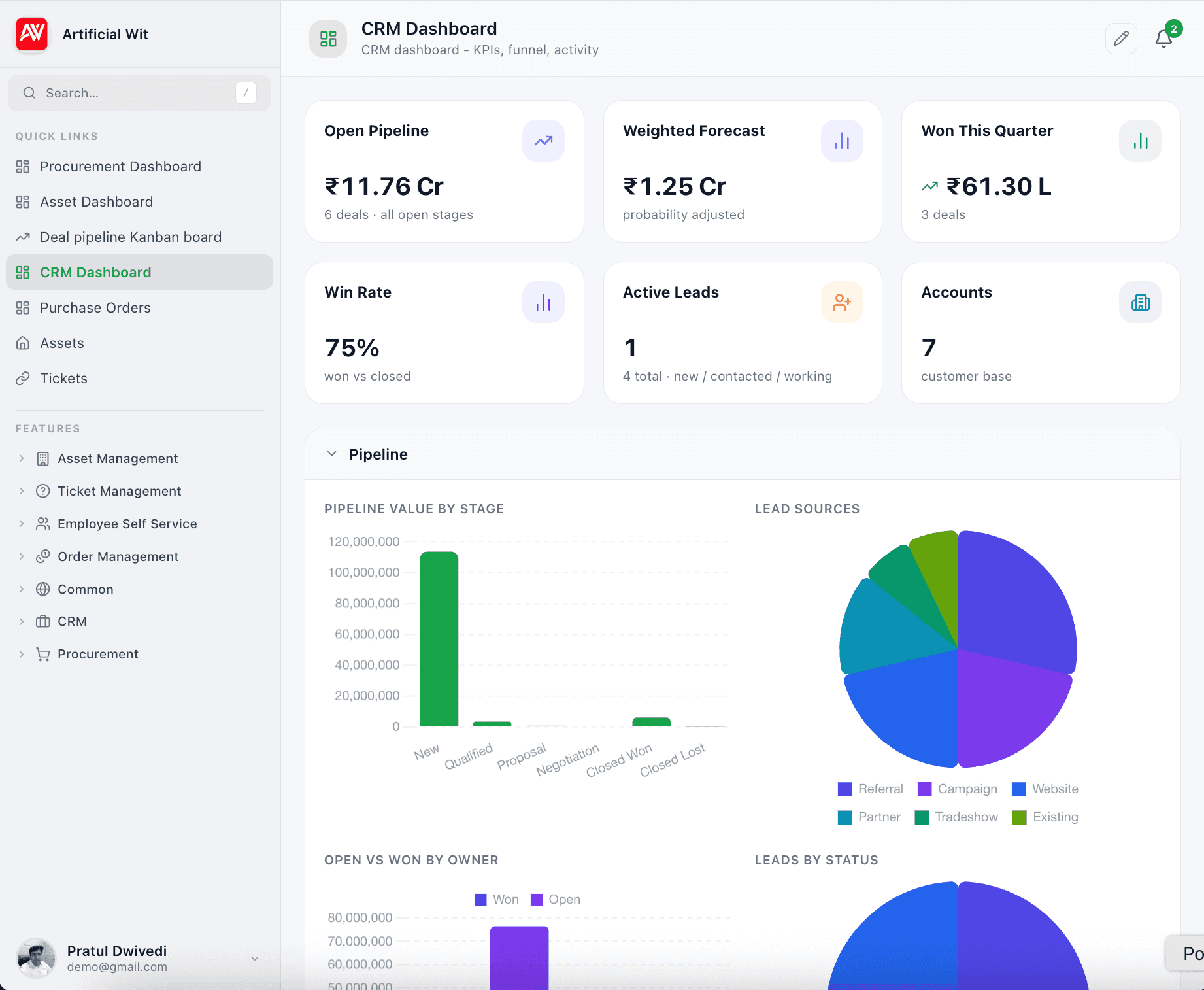
Six numbers at the top, four breakdowns below, and the two lists that actually drive a pipeline review.
Headline numbers
- Open pipeline
- Weighted forecast
- Won this quarter
- Win rate
- Active leads
- Accounts
Breakdowns
- Deal funnel by stage
- Lead sources
- Lead status mix
- Owner leaderboard — open vs won
Closing soon
Deals approaching their close date, each tagged by urgency — overdue, today, this week, or upcoming — so the list sorts your day for you.
Recent stage changes
What moved since you last looked, from which stage to which, and who moved it. Movement is the signal a pipeline review is usually hunting for.
Your pipeline, answerable from Claude or ChatGPT
Pair the CRM with AI Assistant and the same Model Context Protocol layer that exposes your other systems can expose your pipeline — so the answer arrives in conversation rather than as a report you have to build first.
- What's the weighted forecast for this quarter?
- Which deals are overdue on their close date?
- Where did our best leads come from this year?
- Summarise everything we know about this account.
Common questions
01How is this different from HubSpot or Pipedrive?+
It is not trying to out-feature them. The reason to use it is that your pipeline sits in the same tenant as your AI assistant and your procurement and asset records, under one login — so the customer, the thing they bought, and the ticket they raised are already together, with no integration to build or maintain.
See the full HubSpot and Pipedrive comparisons →02Can I set up more than one pipeline?+
Yes. Pipelines and their stages are both configurable, so different sales motions can run side by side with stages that suit each.
03How is the forecast calculated?+
Deals carry a probability driven by the stage they are in, and the weighted forecast rolls those up. Because stage changes update probability automatically, the forecast reflects where deals actually are rather than what was last typed in.
04Can I restrict what each user can see?+
Yes, per record. Every lead, account, contact and deal carries an access scope — private to its creator and administrators, protected to the roles you name on it, or public to the whole tenant. The rule is applied when rows are read, so a rep who shouldn't see a deal doesn't get it back in a list, a search or a forecast total.
See our security practices →05Can I use the CRM without the other products?+
Yes. The three products are independent and you turn on whichever ones you need. Sharing a workspace is an option, not a requirement.
Compare all three products →06Can an AI assistant read the CRM?+
If you also use AI Assistant, yes. The same MCP layer that exposes your other systems can expose CRM records, so an assistant in Claude or ChatGPT can answer pipeline questions in conversation.
How the MCP server works →