What Is Generative UI? MCP Apps, A2UI Compared
Generative UI now has three competing standards, MCP Apps, A2UI, and Apps SDK. Compare all three and see why Controlled Generative UI is the safer bet.
By Artificial Wit Team
By Artificial Wit Team. Last updated: July 17, 2026.
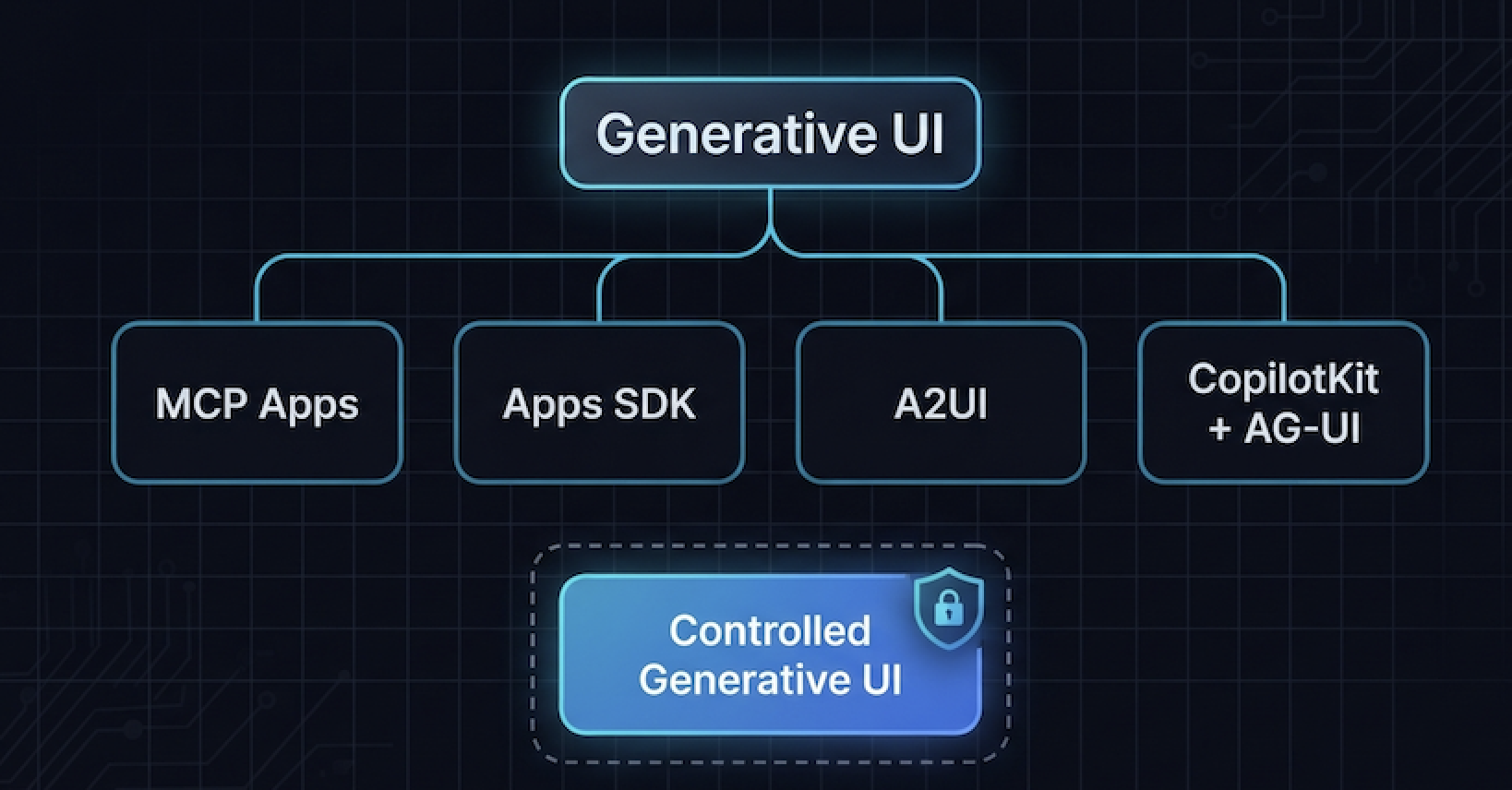
Generative UI is the umbrella term for interfaces an AI agent builds or assembles at runtime — forms, tables, charts, dashboards — instead of a developer hard-coding every screen in advance. MCP Apps, OpenAI's Apps SDK, Google's A2UI, and frameworks like CopilotKit are all specific implementations of it. The differences between them matter more than the shared label suggests.
Priya Nair ran into that gap firsthand. As a platform architect at a 250-person logistics company, she'd been asked to evaluate "some kind of generative UI thing" for an internal support portal after a board member saw a demo at a conference. Three vendor calls in, she'd heard the same phrase mean three different things: an LLM writing raw React components on the fly, a tool call returning a pre-approved form, and a declarative blueprint rendered by a mobile app. Nobody had explained which one she was actually being asked to evaluate.
Curious how this looks in practice on your own tools, not someone else's demo? See Artificial Wit's MCP server →
That confusion is common enough to be worth clearing up directly. This article defines Generative UI in plain terms, maps the standards actually competing for this space in 2026, and explains why the bounded version, what we call Controlled Generative UI, is the one enterprise teams should be evaluating first.
- Generative UI is the umbrella term for AI-generated interfaces; MCP Apps, OpenAI's Apps SDK, Google's A2UI, and CopilotKit are competing implementations of the same broader category.
- MCP Apps (Anthropic, official protocol extension since January 26, 2026) is vendor-neutral across any MCP client; Apps SDK is ChatGPT-specific; A2UI is Google's declarative, cross-platform approach for mobile and desktop.
- CopilotKit and the AG-UI Protocol sit a layer above those three, an open, event-based wire protocol and client framework that abstracts across whichever standard an agent backend speaks.
- Controlled Generative UI, a bounded approach where an agent selects from a fixed set of UI blocks (form, table, chart) rather than generating arbitrary code, is a meaningfully safer pattern for enterprise-internal tools than open-ended generation.
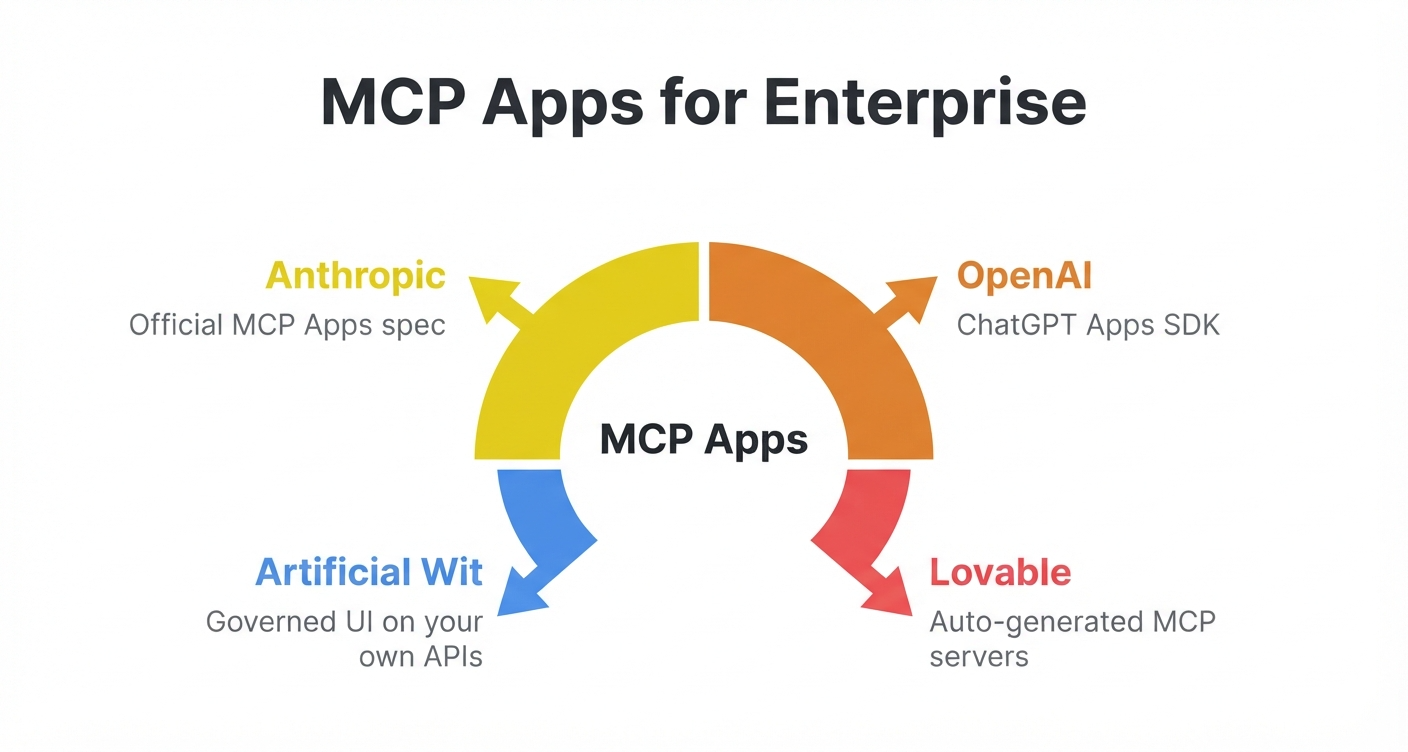
- Artificial Wit's MCP App UI is a working example of Controlled Generative UI: schema-driven, governed by existing role-based access control, and scoped to internal APIs that were never going to be publicly listed.
What Is Generative UI?
Generative UI describes any interface an AI system creates, selects, or assembles in response to a request, rather than one a developer designed and shipped ahead of time. Google Cloud's own research frames it the same way: agent-powered interfaces built at runtime instead of hard-coded in advance. Instead of a fixed screen for every scenario, the model interprets what's needed and produces the relevant form, table, chart, or workflow step.
The category is expanding fast for a simple reason: building a custom front end for every possible tool or workflow doesn't scale. A support team might have forty different internal tools. Hand-building UI for each one is a permanent engineering tax. Generative UI removes that tax. The interface follows from what the tool already describes about itself — its inputs, its outputs, its shape — instead of a developer describing it twice.
That's the mechanism worth understanding before comparing vendors: Generative UI isn't one product. It's a pattern, and at least four different groups are currently building competing, overlapping implementations of it.
The Three Competing Protocol Standards
Three separate efforts, backed by three different companies, currently define how a tool call turns into interactive UI. The real answer to "MCP Apps vs A2UI vs Apps SDK" comes down to one question: who is each one actually built for? They solve the same underlying problem with different assumptions about who's building the client and who's building the tool.
MCP Apps (Anthropic)
Anthropic officially launched MCP Apps on January 26, 2026, as the first extension to the Model Context Protocol, the open standard connecting AI models to tools. When a tool declares a UI resource, any MCP-compatible client, Claude, VS Code Insiders, Goose, and others, renders it directly instead of returning plain text. It's vendor-neutral by design: any MCP server can implement it, and any compliant client can display it.
OpenAI's Apps SDK
OpenAI's Apps SDK follows the same general idea, tool calls returning interactive UI, but scoped specifically to ChatGPT. Developers build an app once and reach ChatGPT's user base through an in-product directory that opened for broader submissions in July 2026. It optimizes for distribution inside one very large client, not for working across every AI assistant a company might use.
Google's A2UI
Google's A2UI takes a different technical approach: declarative UI blueprints rather than one-off generated markup, built for consistent rendering across mobile and desktop surfaces. According to Google's own developer blog, A2UI is explicitly positioned as complementary to MCP Apps rather than competing with it. They solve different layers of the same broader problem.
| MCP Apps | Apps SDK | A2UI | |
|---|---|---|---|
| Governed by | Anthropic / open MCP spec | OpenAI | |
| Primary client | Any MCP-compatible client | ChatGPT | Cross-platform (mobile, desktop) |
| Approach | Tool declares a UI resource | Tool calls return app UI | Declarative UI blueprints |
| Best fit | Vendor-neutral tool builders | Reaching ChatGPT's user base | Consistent cross-platform rendering |
Want the full mechanism behind schema-driven UI generation, not just the news? Read how MCP App UI turns a schema into a form →
The Framework Layer Built on Top: CopilotKit and AG-UI
Underneath and across those three standards sits a separate layer of agentic UI framework tooling, client libraries and wire protocols that don't pick a single vendor. They abstract over whichever standard an agent backend happens to speak.
CopilotKit is the most visible example. It's a multi-framework SDK — React, Angular, Vue, and React Native are all supported. It's built around a `useAgent` hook that gives a frontend programmatic access to an agent's state and lets that agent render UI directly into the page. CopilotKit bundles three things into one client library: Generative UI, shared state between agent and interface, and human-in-the-loop pausing. That last piece is a UI component that stops and asks the user to confirm before an agent proceeds.
CopilotKit runs on the AG-UI Protocol, an open, event-based standard for agent-to-frontend communication. AG-UI defines roughly sixteen standard event types streamed over Server-Sent Events or WebSockets. It also occupies a distinct layer from the protocols already covered. MCP standardizes how an agent calls tools. AG-UI standardizes how an agent talks to the frontend rendering its output. And A2A (agent-to-agent) standardizes how two agents talk to each other. They're complementary layers of the same stack, not competitors.
AG-UI has real backing beyond CopilotKit too. LangGraph, CrewAI, Microsoft's Agent Framework, Google's ADK, AWS Strands Agents, Pydantic AI, and LlamaIndex have all adopted it as their reference frontend protocol.
Marcus Webb, a senior engineer evaluating agent frameworks for a mid-sized insurance software vendor, spent a week in April 2026 trying to figure out whether AG-UI was "another MCP" his team would need to support alongside the one they'd already built. It isn't. MCP already handled his team's tool-calling layer. AG-UI would only have mattered if he'd also been rebuilding the frontend-to-agent communication layer from scratch, which he wasn't. Understanding that MCP and AG-UI solve different problems saved him from a redundant integration effort.
Controlled Generative UI: The Governed Middle Ground
Here's the distinction most Generative UI coverage skips. An agent that can generate arbitrary UI code and an agent that can only select from a fixed, pre-approved set of UI blocks are not the same risk profile, even though both get called "Generative UI."
Fully open-ended generation — an LLM writing raw markup or component code on the fly — is powerful but unpredictable. For a consumer demo, unpredictability is a feature. For an internal enterprise tool touching real data, it's a liability.
A security review team evaluating that pattern has to ask questions a fixed-block system never raises. What happens if the model generates something malformed? What if it behaves differently for different users, or renders something nobody explicitly approved?
Controlled Generative UI describes the other end of that spectrum: the agent still generates the interface dynamically, but only ever from a closed set of block types — form, table, chart, dashboard — each one already vetted, tested, and governed. Nothing arbitrary gets rendered. What changes at runtime is which block appears and what data populates it. That's driven by the tool's own input schema, not by whether an unbounded model can write UI code directly.
That distinction is exactly what Artificial Wit's MCP App UI already does. A tool's input schema — its field names, types, and required arguments — determines which of a known set of blocks renders and how it's populated. That's the same underlying mechanism behind turning an API's input schema into an MCP tool. A ticket-creation tool with an `order_id`, an `issue_category`, and a `priority` field automatically produces a matching form. Nothing about that process lets the model write novel interface code. It selects and populates from a governed vocabulary of blocks.
Governance carries through the same way. Every one of those generated blocks inherits Agent Governance, the same Access Control model that already governs every resource on the platform: Knowledge Items, Agents, LLM models, APIs, and Users. A priority dropdown a support rep sees can differ from the one a manager sees, with no one hand-coding two versions of the form. The generation process never steps outside the rules already set for that role.
Six weeks after her three confusing vendor calls, Priya presented her findings to the board member who'd started the whole evaluation. Her recommendation wasn't "adopt Generative UI." It was more specific: adopt the controlled version, where the AI never writes arbitrary interface code and only assembles from a governed set of blocks tied to the access rules the team already trusted. That distinction was what actually got budget approved.
Ready to see Controlled Generative UI on your own internal tools? Sign up free and connect your first API →
Generative UI for Internal Systems vs. the Marketplace Model
MCP Apps, Apps SDK, and A2UI share an assumption worth naming directly: all three are built for software meant to be discovered, published, and used by people outside the company that built it. Canva, Figma, and Slack were always going to end up in a marketplace. A regional insurer's internal claims-adjustment tool never was.
That gap is exactly why the governed alternative to the marketplace model matters as its own category, not just a smaller version of the marketplace pattern. Nothing about Controlled Generative UI requires submitting anything to a directory, waiting on a launch-partner review, or making an internal API publicly discoverable. The setup is the same three steps behind every Artificial Wit integration: configure the API, generate a key, connect an MCP client. The schema-driven, governed UI is immediately callable.
Frequently Asked Questions
What is Generative UI in simple terms?
Generative UI is an interface that an AI system builds or assembles when it's needed, rather than one a developer designed ahead of time for every possible scenario. The AI interprets a request or a tool's schema and produces the matching form, table, or chart automatically.
Is MCP App UI the same thing as Generative UI?
MCP App UI is Artificial Wit's specific implementation of Generative UI, and more precisely, an example of Controlled Generative UI. It generates a form, table, or chart automatically from a tool's input schema, but only ever from a fixed set of governed block types, never arbitrary code.
What's the difference between MCP Apps, A2UI, and the Apps SDK?
MCP Apps is Anthropic's vendor-neutral protocol extension, usable by any MCP-compatible client. OpenAI's Apps SDK is built specifically for ChatGPT. Google's A2UI uses declarative UI blueprints optimized for consistent cross-platform rendering on mobile and desktop. It's explicitly designed to complement MCP Apps rather than replace it.
What does CopilotKit actually do?
CopilotKit is an open-source client framework (React, Angular, Vue, React Native) that gives agents a `useAgent` hook for reading and writing shared state with a frontend, rendering UI directly, and pausing for human confirmation before continuing. It runs on the AG-UI Protocol underneath.
Is AG-UI a competitor to MCP?
No. MCP standardizes how an agent calls tools. AG-UI standardizes how an agent communicates with the frontend rendering its output. They occupy different layers of the same agentic stack and are designed to work together.
What is Controlled Generative UI?
Controlled Generative UI is an approach where an AI agent generates interfaces dynamically, but only by selecting from a fixed, pre-approved set of UI block types, rather than writing arbitrary interface code. It keeps the flexibility of Generative UI while removing the unpredictability of open-ended code generation. That matters most for enterprise-internal tools handling real data under existing access controls.
The Category Is Set. The Question Is Which Version You Adopt.
Generative UI stopped being a single vendor's pitch sometime in early 2026 and became a real category with at least four serious implementations competing inside it: MCP Apps, the Apps SDK, A2UI, and the CopilotKit/AG-UI framework layer sitting above all three. That's a sign the pattern works, not a reason to pick blindly.
The distinction worth carrying into any evaluation is the one Priya's board member never mentioned on that first conference-demo call: open-ended generation and Controlled Generative UI are not the same risk, even under the same label. For a public-facing consumer app, that flexibility might be the whole point. For an internal claims tool, a support ticketing system, or anything touching data your company already governs carefully, the bounded version is the one that actually gets signed off.
Artificial Wit's MCP App UI is a working, shipped example of that bounded approach: schema-driven, governed by the access controls your team already trusts, and built for systems that were never going to be listed in anyone's marketplace.
Sign up free and connect your first API → No credit card required.
Related reading
Ready to put this into practice?
Talk to us about your stack