From purchase requisition
to disposal, in one trail
Procurement takes a request all the way to paying the supplier. Asset management looks after what you bought for the rest of its life. The two meet at goods receipt — where anything flagged as an asset becomes an asset record automatically, without anyone typing it twice.
Free plan available. No credit card required.
Six steps, one document trail
Every stage produces a numbered document that points back at the one before it, so “why did we buy this?” is always answerable.
PR/Requisition
Someone requests what they need. Value-based approval workflows route it to the right people in order — or approve it immediately when no workflow matches, so small purchases don't need ceremony.
RFQ/ QT/Quotations
Optionally invite quotes from several vendors and compare them side by side on price before awarding.
PO/Purchase order
Commit to buy, with line totals and tax calculated for you. Orders track their own progress from sent through partially received to received.
GRN/Goods receipt
Check deliveries in against the order, with quantity guards. Anything flagged as an asset becomes an asset record automatically — you never type it twice.
INV/Invoice matching
The vendor's bill is matched three ways against what was ordered and what actually arrived. Exceptions block approval until someone reviews them or overrides deliberately.
PAY/Payment
Settle invoices in full or in part. Overpayment is refused, and only approved and processed payments reduce the outstanding balance.
What happens after the invoice is paid
Where each asset is, who holds it, when it was last serviced, what it is still worth, and what happened when it finally left.
Register and allocation
Assets arrive either from a goods receipt or entered directly. Hand them to a person, and move them between locations with a transfer that the receiving end confirms.
Preventive maintenance
Define recurring servicing plans, generate the schedule of what's due when, and turn any due item into a work order with its own task list.
Depreciation
Forecast depreciation across an asset's useful life, post it period by period, and reverse a posting when you need to — most recent period first.
Physical verification
Scope an audit by location or category, pull in the assets it covers, then record each one as found, moved, damaged, not found or extra. Nothing closes with lines still pending.
Disposal
Retire assets through a documented, approvable disposal rather than deleting a row — so the register still explains what happened to everything you ever owned.
Discovery scans
Scan machines on the network and pick up the software installed on them, so what's actually deployed stays visible between audits.
Built for people who get audited
Approval workflows by value
Set a value range and a sequence of approvers — say, anything above ₹1,00,000 needs two steps. Documents land in each approver's inbox in order, and they can approve, reject or return for changes.
Draft first, then act
Saving creates a draft and commits to nothing. A document only enters the process when you press Submit, Issue, Complete or Post — so you can build up a long requisition over several sittings.
Gap-free document numbers
Every document is numbered automatically in strict sequence with no gaps, so PO/00042 really is the forty-second purchase order. Auditors like this.
Status-driven editing
Documents are editable while draft and become read-only once approved, completed or paid. What you can do is always a function of where the document is.
Helpdesk with SLAs
Faults get raised against the asset they concern, so whoever picks the ticket up has that machine’s history in front of them. SLA policies set response and resolution targets, and breaches are flagged on resolution.
Dashboards
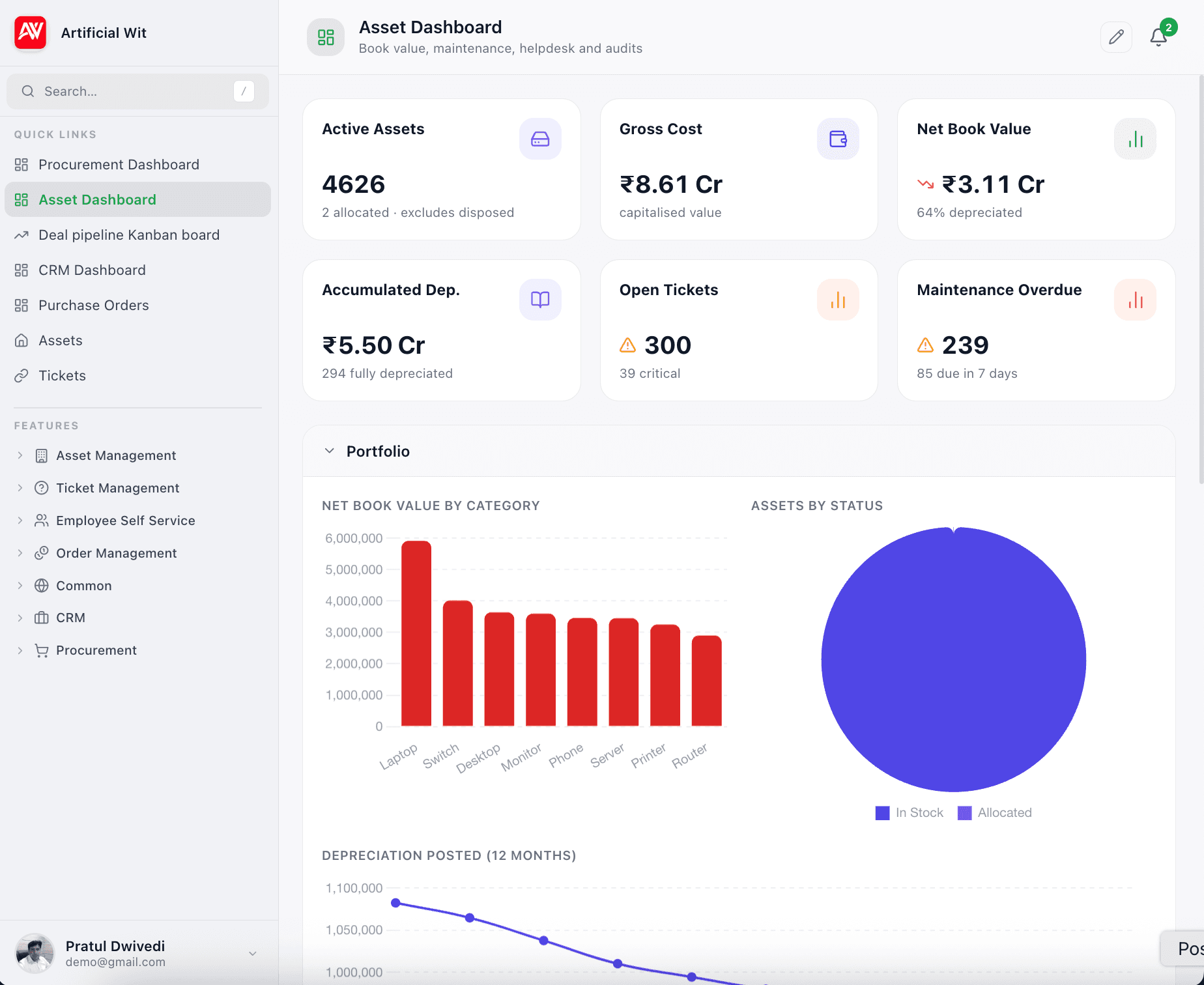
A procurement view — open orders by value, payables ageing, spend, match exceptions, top vendors. And an asset view — gross cost, net book value, how much is depreciated, overdue maintenance, open tickets by priority. KPI cards click through to the list behind them.
Ask your register questions in plain English
Asset Management data is reachable through the same Model Context Protocol layer that powers AI Assistant. Point Claude, ChatGPT or any MCP client at your workspace and it can look up assets, scanned machines and software, open tickets, vendors and orders — instead of you building a report for every question.
- Which assets are due for maintenance this month?
- What's our net book value by category?
- Which invoices are blocked on match exceptions?
- What tickets are open against machines at this location?
Common questions
01Do I have to use the procurement side to use asset management?+
No. Assets can be entered directly as well as created automatically from a goods receipt. Plenty of teams start with the register they already have and adopt purchasing later.
02What is 3-way matching, and can I override it?+
It compares the vendor's invoice against the purchase order and the goods receipt. If they disagree, approval is blocked and the exceptions are listed. You can review and correct the lines, or override deliberately — but not by accident.
03How does depreciation posting work?+
Set a method, price and useful life on the asset, and the system builds a forecast schedule. You post period by period, and posted entries can be reversed — most recent period first.
04Can I restrict what each user can see?+
Yes, per record. Every requisition, order, invoice and asset carries an access scope — private to its creator and administrators, protected to the roles you name on it, or public to the whole tenant. The rule is applied when rows are read, so a restricted purchase order stays out of lists and reports rather than merely being hidden on screen. Approval steps additionally check that you are the named approver.
See our security practices →05Does it track stock levels for consumables?+
No. Receiving goods creates assets and updates the purchasing documents, but running stock balances for consumable items are not maintained. If inventory balances are your main need, say so before you start.
06Can maintenance be scheduled by running hours rather than by date?+
Not yet. A plan will accept a meter-based frequency, but only date-based plans actually generate schedules today. If your maintenance is driven by hours or kilometres, raise it before you start rather than after.
07Does an SLA breach escalate automatically?+
No. A policy can define an escalation time, but nothing acts on it — breaches are flagged when a ticket is resolved rather than chased in advance. Overdue maintenance works the same way: the missed marker is applied when an administrator runs housekeeping, not on a timer.
08Can our AI assistant answer questions about all this?+
Yes, if you also use AI Assistant. The data is reachable through the same MCP layer, so an assistant in Claude or ChatGPT can answer asset, ticket, vendor and order questions instead of you running a report.
How the MCP server works →