How to Query Your CRM Pipeline From Claude or ChatGPT
Ask your CRM pipeline a question in Claude or ChatGPT instead of running a report. Here's how MCP connects your CRM data to any AI client, step by step.
By Artificial Wit Team
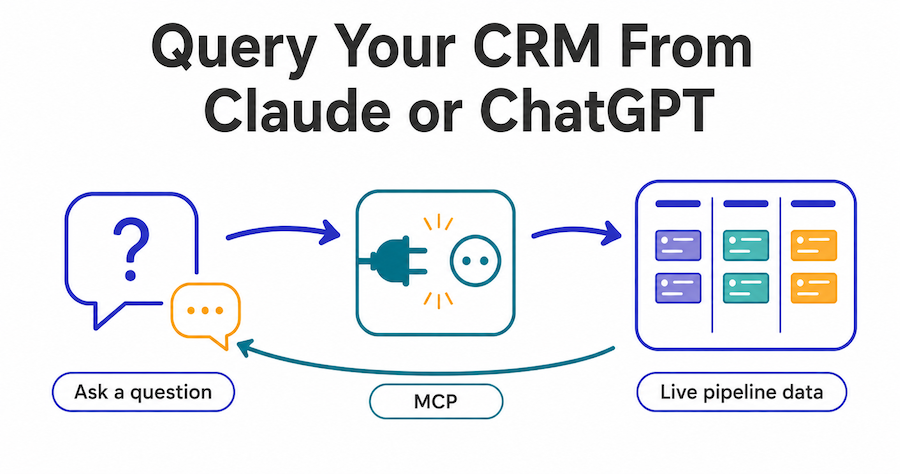
You can query your CRM pipeline from Claude or ChatGPT the same way you'd ask a colleague a question, in plain English. You get an answer pulled from live deal data instead of a report someone ran last week. The mechanism is MCP (Model Context Protocol): your CRM exposes pipeline, forecast, and account data as tools an AI client can call, and the model decides which tool to use based on what you actually asked.
Raj managed a nine-person sales team and used to start every Monday the same way: open the CRM, filter by stage, export to a spreadsheet, then manually check which deals hadn't moved in the last month before his 9am standup. It took about twenty minutes, every week, for a question that had a definite answer sitting in the CRM the whole time. Once the pipeline was queryable directly from Claude, that twenty minutes became one typed question and a fifteen-second wait.
This guide walks through exactly how the connection works, what you can actually ask, and how to set it up. For the broader picture of what makes a CRM's AI layer native rather than bolted on, see AI-native CRM software.
- MCP lets Claude, ChatGPT, or any MCP-compatible client call your CRM as a tool, not just discuss it in the abstract.
- Setup is three steps: authenticate (an API key or OAuth with your own email and password), connect your MCP client to the endpoint, ask a question.
- Access control still applies. The agent only returns data the requesting user is already permitted to see.
- Practical questions include forecast summaries, overdue-deal lists, lead-source breakdowns, and account histories.
- This replaces the export-filter-recalculate ritual most sales-ops questions still go through manually.
What actually happens when you "ask" your CRM a question
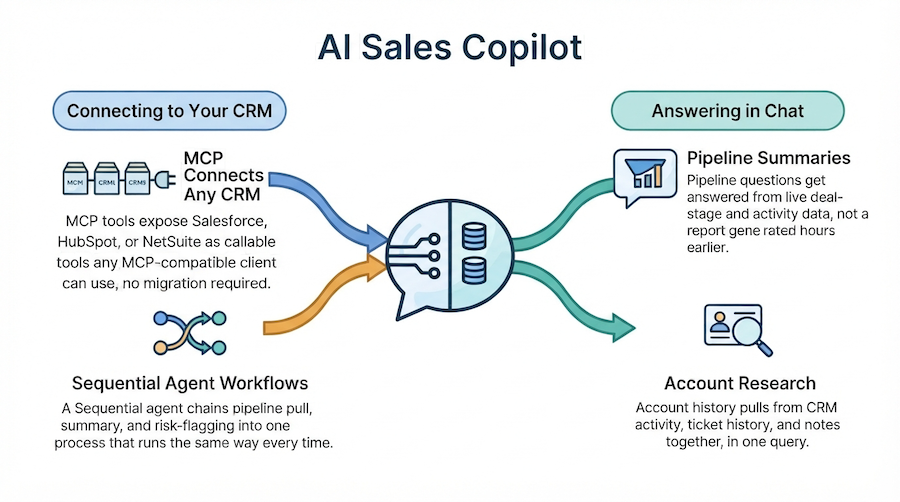
When you type a question into Claude with an MCP client connected, the model doesn't guess an answer from training data. It calls a tool. The CRM's MCP server exposes specific functions (get pipeline by stage, get deals by owner, get forecast summary) along with a description of what each one does and when to use it. Claude reads your question, matches it to the right tool or combination of tools, calls it, and writes a response using the data that comes back.
That's the same mechanism covered in our guide to what an MCP server actually does, applied specifically to CRM data instead of a generic API. The Model Context Protocol spec is what standardizes this so the same connection works whether you're using Claude Desktop, a custom internal app, or another MCP-compatible orchestrator.
Setting up the connection
1. Authenticate. There are two ways to do this, not just one. Generate an API key from your Artificial Wit dashboard for scripted or service connections, or connect via OAuth using your own Artificial Wit email and password, no separate key to generate or store. Most people connecting their own MCP client (Claude Desktop, Cursor) use OAuth; API keys tend to fit automated or service-to-service setups better.
2. Connect your MCP client. Point Claude Desktop, Cursor, or another MCP-compatible client at Artificial Wit's MCP endpoint, using whichever credential you chose in step 1. Most clients confirm the connection within a few seconds.
3. Ask a question. No configuration beyond that. The CRM's tools are already exposed once the endpoint is connected, so the first real query can be your actual Monday-morning question, not a test.
Ready to connect your own pipeline? Sign up free, no credit card required, and go from signup to your first pipeline query in a few minutes.
What you can actually ask
The useful questions tend to fall into a handful of categories:
- Forecast summaries: "What's our weighted forecast for this quarter, broken down by owner?"
- Stalled deals: "Which deals in the enterprise segment haven't moved stage in 30 days?"
- Lead source performance: "Which lead source converted the highest percentage of leads to closed-won this month?"
- Account history: "Summarize the last three interactions logged on the Acme Corp account."
- Pipeline health: "How many deals are currently in the proposal stage, and what's their combined weighted value?"
Sofia ran RevOps for a mid-market SaaS company and got asked the same question by three different VPs in one week: "what does the enterprise pipeline actually look like right now." Instead of building a dashboard view for a question that might not come up again next month, she just asked it directly and forwarded the answer. The question that used to justify a new saved report became a five-second query instead.
Governance: the agent only sees what you're allowed to see
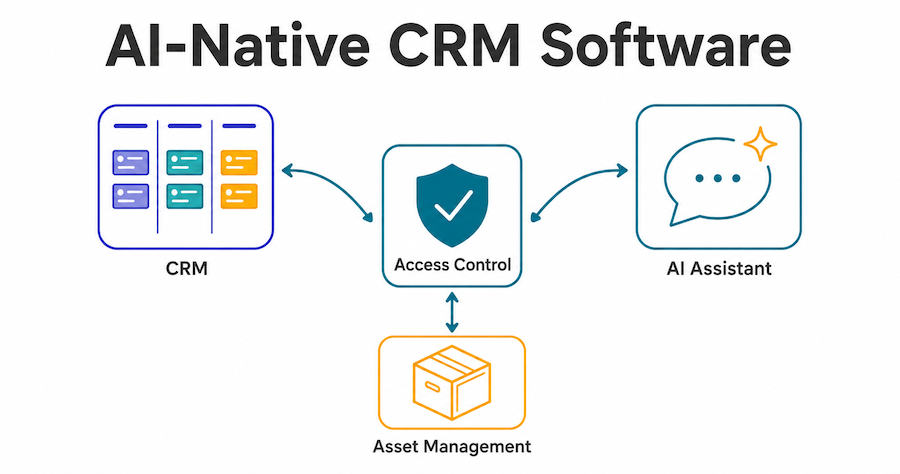
The MCP connection doesn't bypass access control. It inherits it. If a deal record is marked Protected and scoped to a specific team, a query from someone outside that team returns the same "no access" result it would if they'd opened the CRM directly and tried to view the record. Role-based access control applies per query, not just per login session.
This matters because it's the same governance model already documented for agents and knowledge bases: the AI only sees and does what the requesting user is already authorized to see. A CRM query isn't a backdoor around permissions someone set up deliberately.
What this replaces (and what it doesn't)
This isn't a replacement for the CRM's own dashboards, drag-and-drop pipeline board, or reporting views. It's an additional way to get at the same underlying data for the specific, often one-off questions that don't justify building a new saved report. The dashboard is still where you go to actually move a deal card between stages or edit a contact record.
| Task | Best tool |
|---|---|
| One-off pipeline question ("which deals are stalled") | MCP query via Claude/ChatGPT |
| Moving a deal between stages | CRM dashboard |
| Recurring weekly report a whole team checks | CRM dashboard's saved views |
| Ad hoc account research before a call | MCP query |
| Bulk editing multiple records | CRM dashboard |
Frequently asked questions about querying a CRM through MCP
Do I need to write code to connect Claude to my CRM?
No. Connecting an MCP client is a configuration step: authenticate with either an API key or OAuth (your own email and password), point the client at the endpoint, done. No custom integration code is required for this.
Can the AI take actions in my CRM, not just answer questions?
The same MCP connection that answers questions can also expose write actions (updating a deal stage, logging a note), depending on which tools are enabled and what the requesting user's permissions allow.
Does this work with any AI client, or just Claude?
Any MCP-compatible client works, including Claude Desktop, Cursor, and custom orchestrators built on the open MCP spec, not just one vendor's product.
What happens if I ask about a record I don't have access to?
The query returns the same access-denied result you'd get trying to open that record directly in the CRM. The AI layer doesn't grant access the underlying permissions don't already allow.
How is this different from a chatbot that answers generic CRM questions?
A generic chatbot answers from what it was trained on or told in the conversation. This calls a live tool against your actual pipeline data, so the answer reflects what's true in the CRM right now, not a cached or approximate summary.
Getting started
The setup is genuinely three steps. The payoff shows up the first time a one-off pipeline question doesn't cost you an export and a filter. Start with a question you'd normally answer manually on a Monday morning, and see how it compares to asking directly.
Sign up free and connect your CRM to Claude or ChatGPT → No credit card required.
Related reading
Ready to put this into practice?
Talk to us about your stack