AI Sales Copilot: Pipeline Summaries From the CRM You Already Run
Reps spend 17% of their week on CRM data entry. An AI sales copilot answers pipeline and account questions from live CRM data instead. Get started free.
By Artificial Wit Team
By Artificial Wit Team. Last updated: July 9, 2026.
An AI sales copilot is a chat assistant that pulls pipeline summaries and account research directly from the CRM and sales APIs you already run, using MCP tools, instead of a stale export or a new dashboard nobody opens. It doesn't require switching CRMs. It connects to the one on your desk right now.
Theo led RevOps for a mid-market software company, and every Monday started the same way: a sales manager asking for a pipeline summary that meant exporting a report, waiting on a BI refresh, and reformatting it into something a VP would actually read. By the time it was ready, half the numbers had already moved. The problem was never that the data didn't exist. It was that getting a current answer took longer than the question deserved.
That's the gap an AI sales copilot closes. Not a new CRM, a chat layer that reads the one you already have.
- An AI sales copilot answers pipeline and account questions from live CRM and sales-API data, not a cached export or a BI dashboard refresh.
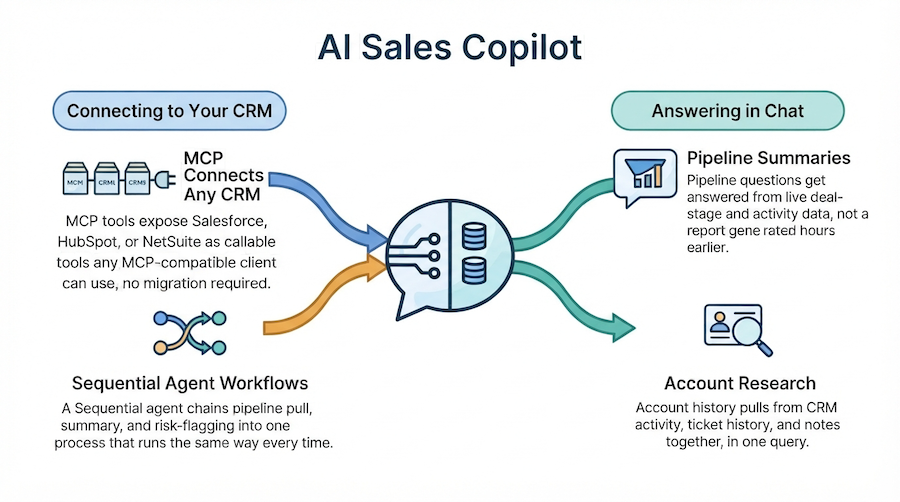
- MCP tools expose Salesforce, HubSpot, or NetSuite as callable tools, so the copilot works with the CRM you already run, no migration.
- Sales reps spend 17% of their week, about 5.5 hours, on CRM data entry alone, per Forrester's Activity Study of 3,031 reps cited in Salesforce's 2025 State of Sales research.
- Gartner predicts 40% of enterprise applications will feature task-specific AI agents by 2026, up from less than 5% in 2025, and CRM-anchored workflows are leading that shift.
- Sequential agents can chain pipeline pull, summary, and risk-flagging into one workflow instead of a single-turn chatbot answer.
What Is an AI Sales Copilot?
An AI sales copilot is a conversational assistant that answers pipeline, account, and forecast questions by calling your CRM and sales APIs directly, rather than working from a static export or a dashboard someone has to build and maintain. The answer is current because the copilot queried live data at the moment of the question, not because a report was refreshed on schedule.
The distinction that matters for RevOps leaders evaluating this category as an AI copilot for sales pipeline summaries and account research: a copilot bolted onto a specific CRM vendor's own AI feature locks you into that vendor's roadmap. A copilot built on MCP tools works with whichever CRM, or combination of systems, you actually run.
Pipeline Summaries and Account Research, Answered From Live CRM Data
Asking "what's the status of the Acme account" or "summarize this quarter's pipeline by stage" gets answered by querying the CRM directly at the time of the question, not by pulling a report generated hours or days earlier. That immediacy is the entire value proposition. Theo's Monday problem wasn't that the data was wrong. It was that current data took too long to become readable.
This is the fix: the same question, asked in chat, answered from the same system of record the CRM already is, with no export step in between.
Account research follows the same pattern. It's where the copilot doubles as an AI account research tool. A rep preparing for a renewal call used to mean opening the CRM, then the support-ticket system, then a shared notes doc, then piecing together a picture from all three. A copilot connected to each system as an MCP tool answers "what's the history with this account" in one query, pulling from CRM activity, ticket history, and notes together, rather than a rep tab-switching between systems that don't talk to each other.
What a Typical Pipeline Question Looks Like
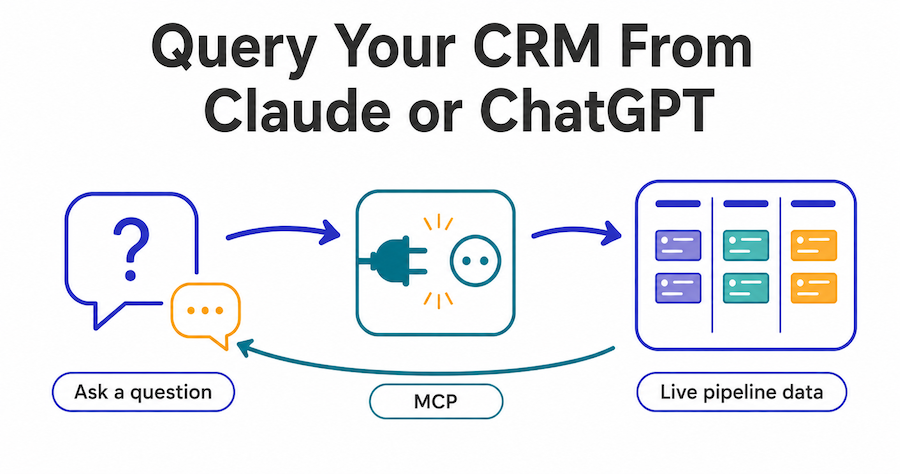
A sales manager asking "which deals in the enterprise segment haven't moved stage in 30 days" used to mean exporting a report, filtering it manually, and cross-referencing dates by hand. The same question asked of a copilot connected to the CRM via MCP returns the answer directly, because the agent queried deal-stage and last-activity fields live rather than working from a snapshot. The manager gets an answer in the time it took to ask the question, not the time it took to build a report.
How MCP Connects a Copilot to Salesforce, HubSpot, or NetSuite
MCP tools expose your CRM and sales APIs as callable tools any MCP-compatible client can use — the difference between a CRM AI assistant tied to one vendor and one that works with whichever system you actually run. As an MCP server, Artificial Wit turns your Salesforce, HubSpot, or NetSuite API into a tool an agent calls directly. As an MCP client, it can also connect out to a CRM vendor's own MCP server if one exists, without your team building that connector from scratch.
| Approach | What it requires | Vendor lock-in |
|---|---|---|
| CRM vendor's native AI feature | Nothing extra, but limited to that CRM | High, tied to one vendor's roadmap |
| Custom integration per LLM | Engineering time per model, per CRM | Low, but expensive to maintain |
| MCP-based sales copilot | Configure the API once as an MCP tool | Low, model-agnostic and CRM-agnostic |
Sequential Agents: Chaining Pipeline Pull, Summary, and Risk Flagging
A single-turn chatbot answers one question at a time. A Sequential agent runs a multi-step workflow: pull pipeline data, summarize it by stage, then flag deals that haven't moved in a defined window, as one chained process instead of three separate prompts. This is the same agent-orchestration mechanism covered in the broader platform architecture. The same pattern agentic AI for enterprise applies across other functions — here it's pointed specifically at a recurring RevOps task.
That structure matters because pipeline hygiene isn't a single question. It's a repeated process. A Sequential agent configured once keeps running that same chain every Monday, rather than a RevOps lead re-prompting a chatbot from scratch each time.
Why This Isn't Another Dashboard Reps Have to Learn
The objection RevOps leaders raise first: "we don't want another tool our reps ignore." That's the case for a sales copilot without a new dashboard: it isn't a new interface to learn. It's a chat layer answering questions reps already ask a manager or a report, using data that already lives in the CRM they already use every day.
The cost of the status quo is measurable. Sales reps spend 17% of their week, roughly 5.5 hours, on CRM data entry alone, according to Forrester's Activity Study of 3,031 reps, cited in Salesforce's 2025 State of Sales research. That's time not spent selling, lost to the same systems a copilot is meant to make faster to query, not harder to maintain.
The category is moving fast enough that waiting isn't neutral. Gartner predicts 40% of enterprise applications will feature task-specific AI agents by 2026, up from less than 5% in 2025, and CRM-anchored workflows are one of the categories leading that shift.
That shift matters most for teams evaluating build-versus-buy on this specific problem. Building a custom copilot in-house means picking one CRM's API, one LLM vendor, and maintaining that integration as both change. An MCP-based approach decouples those choices: the CRM connection, the model, and the agent's workflow logic can each change independently, which matters when a company is running Salesforce today and evaluating a different system next year, or wants to swap which LLM powers the copilot without rebuilding the whole integration.
Getting Started
- Connect your CRM as an MCP tool. Configure Salesforce, HubSpot, or NetSuite's API so an agent can query it directly, no custom integration code required, and no separate connector per LLM.
- Configure a Standard agent for one-off questions. Point it at the CRM tool and a knowledge base of sales playbooks or account notes if relevant, so both live data and static reference material get grounded answers from the same assistant.
- Add a Sequential agent for recurring workflows. Chain pipeline pull, summary, and risk-flagging into one process that runs the same way every Monday, instead of a manager re-prompting from scratch.
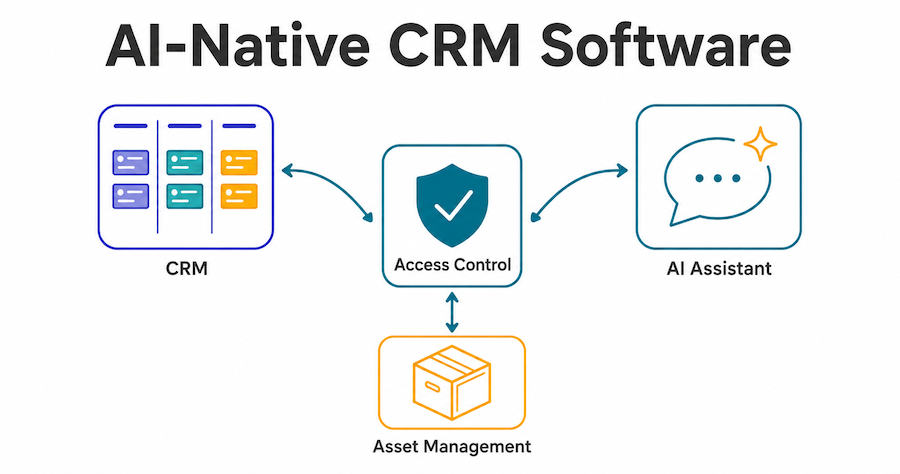
- Set Access Control by role. A sales rep and a VP asking the same question should be able to get appropriately scoped answers, not identical unrestricted access to every account in the CRM.
Most RevOps teams get their first pipeline-summary agent running end to end in a single session.
Frequently Asked Questions
What is an AI sales copilot?
An AI sales copilot is a chat assistant that answers pipeline, account, and forecast questions by querying your CRM and sales APIs directly, so the answer reflects live data instead of a cached export or scheduled report.
How does AI help sales teams with account research?
By calling the CRM's API directly through an MCP tool, an agent can answer "what's the status of this account" or "summarize recent activity" from current data, without a rep manually opening multiple tabs or waiting on a report.
Do we need to switch CRMs to use an AI sales copilot?
No. MCP tools expose whichever CRM you already run — Salesforce, HubSpot, NetSuite, or others — as a callable tool. The copilot works with your existing system, not a replacement for it.
Can a sales copilot run a multi-step workflow, not just answer one question?
Yes. Sequential agents chain steps together, for example pulling pipeline data, summarizing it, then flagging at-risk deals, as one configured process instead of a single-turn chatbot response.
Will this replace our BI dashboards?
Not necessarily. It removes the wait for scheduled refreshes on the specific, conversational questions reps and managers ask most often, complementing a BI dashboard rather than replacing deeper analytical reporting.
Can the copilot pull from more than one system at once?
Yes. A single agent can have multiple MCP tools assigned, a CRM, a support-ticket system, an internal notes database, so account research draws from all of them in one answer instead of requiring separate queries per system.
Common Objections, Answered With the Mechanism
RevOps leaders evaluating this category tend to raise three concerns before anything else.
"Will this lock us into one CRM?" MCP itself answers this. The connection is configured once as a tool, and swapping or adding a CRM means configuring a new tool, not rebuilding the copilot.
"Will reps actually use it, or ignore it like the last tool?" The interface answers this one. It's chat, answering questions reps already ask a manager, not a new screen with its own navigation to learn.
"What if the data is wrong?" The architecture answers it. The copilot queries the CRM directly at the moment of the question, so an inaccurate answer means the CRM itself is wrong, not that the copilot introduced a new source of error on top of the system of record.
The Copilot That Reads the CRM You Already Have
Theo's Monday problem wasn't a data problem — the numbers were always there. It was a speed-to-readable-answer problem. That's exactly what an MCP-connected AI sales copilot fixes: pipeline summaries and account research answered from live CRM data, chained into recurring workflows where needed, without asking a sales team to adopt a new system to get there. It's one of several ways teams put this pattern to work, see other use cases across support, ERP, and search, including the same live-lookup mechanism applied to retail order and inventory data.
Sign up free, no credit card required, and connect your first CRM API as an MCP tool in one session.
Related reading
Ready to put this into practice?
Talk to us about your stack