AI-Native CRM Software: One Platform, Not a Bolted-On MCP Server
AI-native CRM means your pipeline lives in the same tenant as your AI assistant, not a separate app with an MCP server bolted on. See how it actually works.
By Artificial Wit Team
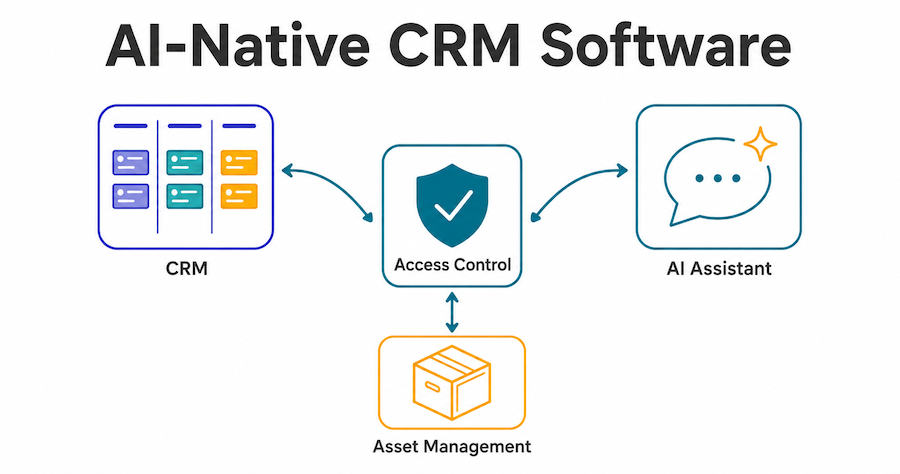
AI-native CRM software means your pipeline, contacts, and deals live in the same governed platform as your AI assistant, not a separate app that bolted an MCP server on afterward. That distinction matters more than it sounds. As of mid-2026, most major CRMs — including Pipedrive, HubSpot, and Zoho — already ship their own MCP servers, so "you can talk to it with Claude" stopped being a differentiator months ago. The real question isn't whether your CRM has an MCP endpoint. It's whether that endpoint shares the same access control, tenant, and governance model as everything else your AI touches.
Elena ran RevOps for a 40-person sales team that had just finished rolling out an AI assistant for support and internal knowledge search. When leadership asked for the same "ask a question, get a pipeline answer" experience for sales, her first instinct was to check whether Pipedrive's new MCP server would do the job. It would, technically. But it meant a second OAuth connection, a second set of access-control rules to maintain, and a second place for IT to audit if something went wrong. The AI assistant and the CRM would still be two systems that happened to both talk to Claude, not one governed platform.
This guide covers what "AI-native CRM" actually means, where the term is honest and where it's marketing, how the pipeline and governance mechanics work, and how to query it directly from Claude or ChatGPT.
- Native MCP support in a CRM is no longer rare. Pipedrive, HubSpot, Zoho, NetHunt, Close, and Affinity all shipped MCP servers by mid-2026, so MCP alone isn't the differentiator it was a year ago.
- The real distinction is tenancy: whether CRM, AI assistant, and other business systems share one Access Control model, or whether each system's AI layer was bolted on separately.
- Weighted forecasting updates automatically from deal stage. Nobody manually recalculates a probability percentage.
- Record-level access control (Private, Protected, Public) applies the same governance model already used for knowledge bases and agents.
- You can query pipeline, forecasts, and account data directly from Claude or ChatGPT through the same MCP endpoint the rest of the platform uses.
What "AI-native CRM" actually means (and what it doesn't)
An AI-native CRM is one where pipeline and deal data were built inside the same platform as the AI layer, sharing its tenant, its authentication, and its access-control rules from day one. It's not simply a CRM with an MCP server attached to it.
That distinction used to be rare. It isn't anymore. NetHunt built its whole positioning around CRM MCP servers. Pipedrive announced a native MCP server that brings CRM workflows directly into AI assistants. HubSpot, Zoho, Close, and Affinity all followed the same pattern. If a piece of content tells you it's "the first CRM you can talk to with Claude," treat that as a red flag, not a differentiator, because it's demonstrably not true anymore.
What's actually still uncommon: a CRM that shares one Access Control model, one MCP endpoint, and one tenant with an AI Assistant and an Asset Management product, so that adding CRM to an account you already use for AI isn't a second integration project. Artificial Wit's CRM works this way. The pipeline, the AI Assistant's knowledge base, and Asset Management's procurement records all sit behind the same governance layer — the same Public/Restricted permission model already documented for agents and knowledge bases, extended down to individual CRM records.
See the difference in your own pipeline. Sign up free, no credit card required, and compare a standalone MCP-connected CRM against one that already shares your AI Assistant's access model.
Pipeline and deal management, without leaving the tenant your AI already runs in
The pipeline itself is built around customizable stages that match how your team actually sells, not a fixed template. Deals show up as cards on a drag-and-drop board, and moving a card between stages updates its status and probability automatically.
That last part is easy to skip past, but it's the mechanism behind weighted forecasting. A weighted pipeline multiplies each deal's value by its stage probability and sums the results, so a $50,000 deal at a 20% early stage counts for $10,000 of forecast, not the full amount. Most CRMs make you assign and maintain those probabilities manually. Here, the probability is stage-driven: move a deal from "Discovery" to "Proposal," and its weighted contribution to the forecast updates on its own.
Marcus managed a six-person outbound team. He used to spend the last hour of every Friday recalculating his weighted forecast in a spreadsheet, because his old CRM's probability field was just a number someone typed in during setup and never touched again. Half his deals were sitting at stage-inappropriate probabilities by the time he checked. Once the forecast pulled directly from stage position, that hour disappeared. The number leadership saw on Monday actually reflected where deals stood on Friday, not where they'd stood a month earlier.
The dashboard surfaces six headline numbers on open: open pipeline, weighted forecast, won this quarter, win rate, active leads, and accounts, alongside a deal funnel by stage, lead source and status breakdowns, an owner leaderboard, and a "closing soon" list tagged by urgency (overdue, today, this week, upcoming).
Want to see weighted forecasting update in real time? Explore Artificial Wit's CRM →
Leads, accounts, and the 360 view
Lead tracking includes source attribution and status monitoring from the moment a lead enters the system, so the dashboard's lead-source breakdown reflects where deals actually originate, not a guess filled in after the fact. Company and contact records support a 360-degree relationship view, with multiple contacts attached to a single deal, useful for the B2B reality where a $200,000 contract involves a champion, a budget holder, and a technical evaluator who all need to be tracked separately rather than crammed into one "primary contact" field.
Deals also support multi-currency recording with base-amount conversion, so a global sales team can log a deal in euros or rupees and still see it roll up correctly into a single-currency forecast.
Governance: the same Access Control model as your AI Assistant
Every CRM record carries one of three access levels: Private (visible only to its creator and admins), Protected (visible to specified roles), or Public (visible tenant-wide). This is the identical Public/Restricted framing already used for knowledge bases, agents, and APIs elsewhere on the platform, applied down to the level of an individual deal or contact record.
That matters for a specific, common scenario: a strategic account with sensitive pricing or a not-yet-announced renewal that shouldn't be visible to the whole sales floor. Marking that record Protected, scoped to the account team and their manager, doesn't require a separate permissions system or a workaround. It's the same access-control mechanism the rest of the platform already uses for restricting who can see a knowledge base or call a specific tool.
Every stage change also gets logged automatically: from-stage, to-stage, timestamp, and the user who made the change. That audit trail exists whether or not anyone goes looking for it, which matters the one time a deal's history actually gets questioned.
Querying your pipeline from Claude or ChatGPT
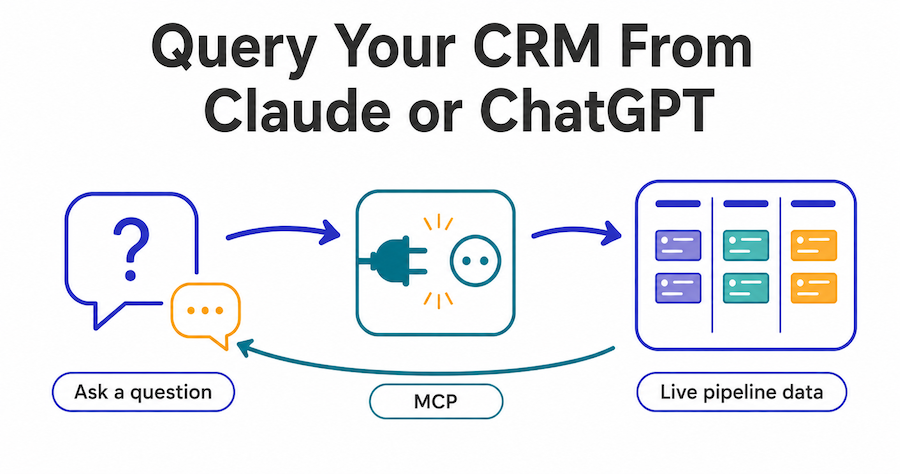
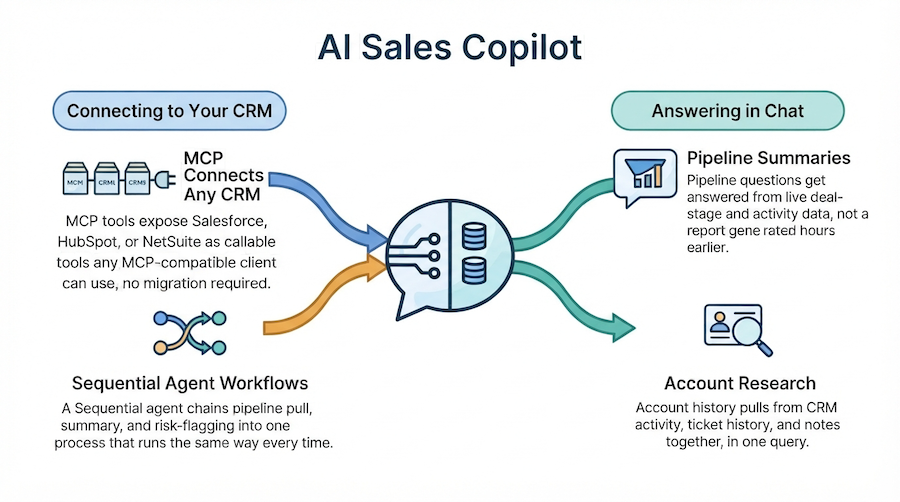
Because the CRM sits behind the same MCP endpoint as the rest of the platform, the pipeline is directly queryable through natural language. Ask which deals in a given segment haven't moved in 30 days, what the current weighted forecast looks like by owner, or which lead source is converting best this quarter, and the answer comes from live pipeline data, not a cached export someone ran last week. For the specific setup steps and example queries, see how to query your CRM pipeline from Claude or ChatGPT.
Ready to ask your own pipeline a question? Sign up free and connect the CRM to your MCP client in minutes.
What it costs to start
The CRM is available on a free plan with no credit card required, the same friction-free entry point used across the rest of Artificial Wit's products. Specific tier limits (seats, deal volume) aren't published on the pricing page as of this writing; confirm current limits at signup rather than relying on a number quoted elsewhere.
CRM vs. the field: HubSpot, Pipedrive, and the AI-native alternative
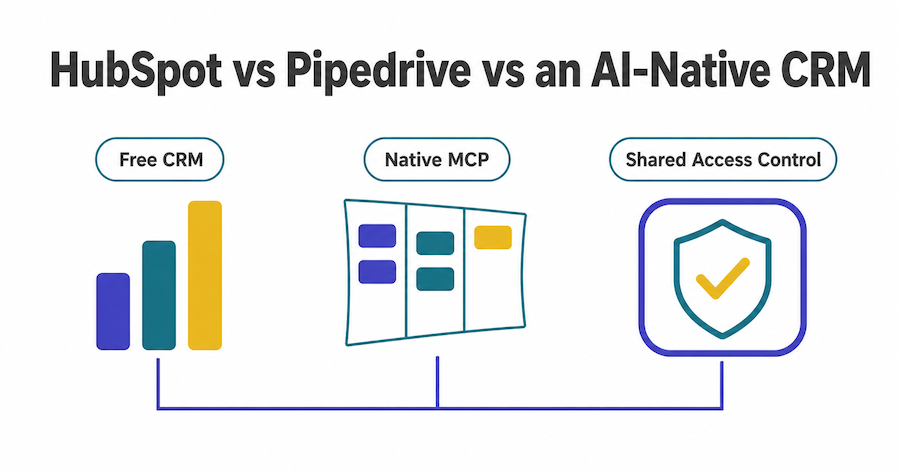
HubSpot remains the most generous free-tier CRM in the market and has an enormous integration ecosystem. Pipedrive built its whole product around visual pipeline management and now ships a native MCP server of its own. Neither is a bad choice, and content claiming otherwise isn't being straight with you.
The honest comparison is narrower: if your team is already running Artificial Wit's AI Assistant, adding CRM means configuration inside an account you already have, under an access-control model you've already learned. It's not a second signup, a second OAuth grant, and a second permissions system to reconcile with the first.
If you're not already on the platform and just need the best standalone CRM, HubSpot's free tier or Pipedrive's pipeline UX may genuinely be the better starting point. This isn't the right fit for every team, and it isn't trying to be.
| HubSpot | Pipedrive | Artificial Wit CRM | |
|---|---|---|---|
| Free tier | Most generous in the market | Limited free trial | Free plan, no credit card |
| Native MCP server | Yes | Yes | Yes |
| Shares tenant with an AI Assistant product | No (separate AI product line) | No | Yes, same tenant and Access Control model |
| Record-level access control | Role-based, CRM-specific | Role-based, CRM-specific | Same Private/Protected/Public model used across CRM, AI Assistant, and Asset Management |
| Best fit | Teams wanting the largest ecosystem | Teams prioritizing pipeline UX | Teams already on (or evaluating) a unified AI platform |
Frequently asked questions about AI-native CRM software
Does this CRM replace HubSpot or Pipedrive? Not necessarily, and not automatically. It's a genuine alternative for teams who want CRM, AI Assistant, and Asset Management under one Access Control model. If you only need a standalone CRM with no AI platform underneath it, HubSpot or Pipedrive remain strong, well-established options.
Can I use the CRM without the AI Assistant? Yes. The products are independent — you're not required to adopt AI Assistant or Asset Management to use CRM.
Does it support multiple pipelines? Yes, multiple pipelines are supported for teams running separate sales motions (for example, new business versus renewals) side by side.
How is my pipeline exposed to AI tools? Through the same MCP endpoint used across the platform, with the same record-level access control applied, so an agent only sees what the requesting user is already permitted to see.
What's different from just adding an MCP server to my existing CRM? A bolted-on MCP server connects an existing CRM to an AI client, but the CRM's own permissions and the AI layer's permissions are still two separate systems to maintain. Here, they're one system to begin with.
Getting started with an AI-native CRM
The MCP-connected CRM race is basically over. Most major players shipped a server in 2026. What's still worth evaluating is whether your CRM's access model is the same one governing the rest of your AI stack, or a second system your IT team has to reconcile with the first. If you're already running Artificial Wit's AI Assistant, adding CRM is configuration, not a project. If you're evaluating from scratch, compare it honestly against HubSpot and Pipedrive rather than taking either company's word, including this one, at face value.
Sign up free and connect your first pipeline → No credit card required.
Related reading
Ready to put this into practice?
Talk to us about your stack