AI for Customer Support: Grounded Answers, Not Guesses
AI for customer support means grounded, cited answers pulled from docs, tickets, and CRM data, not guesses. See how it works and connect your stack free today.
By Artificial Wit Team
By Artificial Wit Team. Last updated: July 8, 2026.
AI for customer support means an assistant that answers tickets using your actual product docs, ticket history, and CRM data, with a citation attached. It doesn't guess from general training data. That distinction, grounded versus guessed, is the difference between a tool support teams trust and one they quietly stop using.
Renata ran support for a 40-person SaaS company, and every escalation started the same way. A customer would ask about a refund policy that had changed twice in the last year. The AI chatbot on the website answered confidently. It answered wrong twice in one week, quoting an old policy nobody had told it was retired. Renata's team spent more time correcting the bot than the bot saved them.
That's not a chatbot problem. It's a grounding problem. Maybe you're evaluating AI for customer support, or already regretting a tool that guesses instead of citing. Either way, this article walks through what grounded AI support actually means, how the mechanism works, and how to connect your support stack to it without ripping anything out.
- AI for customer support only works if answers are grounded in your actual docs, tickets, and CRM data, with a citation, not generated from general training data.
- A Gartner survey of 5,728 customers found 64% would rather companies not use AI for service at all, and the top complaint was AI giving wrong answers.
- Zendesk's 2026 CX Trends research found 95% of customers want to know why AI reached a decision, but only 37% of companies currently explain it.
- Retrieval-augmented generation (RAG) closes that gap by attaching a source document, similarity score, and reference number to every support answer.
- Permission-aware retrieval means the same assistant returns different results to different agents, based on access they already have, not new rules to configure.
What Is AI for Customer Support?
AI for customer support is software that answers customer or agent questions using retrieval, not raw model recall. It looks up the relevant passage from your knowledge base, ticket history, or CRM record, then generates a response grounded in that retrieved data rather than the model's general training. The key difference from a generic chatbot is the retrieval step: the AI looks something up before it answers, and shows its source.
Most people picture "AI for customer support" as a chat widget that deflects tickets. That's one surface. The more useful version, and the one this article focuses on, is an assistant support agents themselves use to answer faster, pulling from every system they'd otherwise tab between by hand.
Why Generic Chatbots Aren't Real AI for Customer Support
The trust problem isn't hypothetical. According to a Gartner survey of 5,728 customers, 64% would prefer companies didn't use AI for customer service at all. The top concern wasn't job displacement. It was AI giving the wrong answer.
However, that concern is earned. A general-purpose LLM with no retrieval step doesn't know your refund policy changed last quarter. It doesn't know a specific customer's ticket history. It doesn't know which CRM field holds the account's renewal date. Ask it anyway, and it answers confidently, because confident-sounding text is what the model was trained to produce, not necessarily correct text.
As a result, the fragmentation makes support work worse, not better. Support agents already juggle product docs, a ticketing system, and CRM fields nobody remembers the name of.
Layer a generic chatbot with no access to any of it on top, and you've added a fourth system that guesses instead of helping. That's not AI for customer support. It's one more tab to check and doubt.
Want to see how grounded support answers actually work? Keep reading, or explore Artificial Wit's AI Assistant directly.
How Grounded AI Support Answers Actually Work
Grounded AI support runs on retrieval-augmented generation (RAG). Before the model answers, it retrieves the most relevant passages from your actual sources. Then it generates a response using that retrieved text as the basis for the answer.
RAG, Citations, and Similarity Scores in Plain Language
Every answer from a properly grounded assistant carries three things: the source document it pulled from, a similarity score showing how closely that passage matched the question, and a reference number the agent can click to verify. This isn't a black box producing a confident paragraph; it's a paragraph with receipts attached.
This matters more in customer support than almost anywhere else in the business. Zendesk's 2026 CX Trends report found that 95% of customers want to know why AI made a given decision, but only 37% of companies currently offer any reasoning behind it. Citations close that exact gap; they're the reasoning, made visible. This is what separates a genuinely grounded AI support assistant from a chatbot that merely sounds confident.
Permission-Aware Retrieval
Grounded retrieval also has to respect who's asking. For example, a tier-1 support agent and a billing specialist shouldn't necessarily see the same fields from the same customer record. Permission-aware retrieval means the AI only returns what the requesting user is already authorized to see. It uses the access rules your team already has, not a separate set of AI-specific permissions to configure and maintain.
Generic Chatbot vs. a Grounded AI Support Assistant
The difference between a generic chatbot and a properly grounded customer support AI assistant comes down to what happens in the half-second before an answer appears:
| Generic AI chatbot | Grounded AI support assistant | |
|---|---|---|
| Answer source | General training data, a guess | Your actual docs, tickets, and CRM records |
| Verification | None, take it on faith | Source document, similarity score, reference number |
| Policy changes | Doesn't know your policy changed last quarter | Retrieves whatever is current at query time |
| Access control | Same answer for every user | Permission-aware, matches existing access rules |
| Trust signal | Confident tone only | Citations the agent can click and check |
Grounded AI answers aren't just more accurate in theory. They're verifiable in practice, which is the entire difference from a support agent's point of view.
Example: Cutting a Refund Escalation From Five Minutes to Under One
Here's what changed for Renata's team after connecting their knowledge base and ticketing system to a grounded AI assistant. A customer messages asking whether they qualify for a refund on a canceled annual plan. Before, an agent would search the internal wiki, hope the refund policy page was current, then cross-check the customer's actual plan and cancellation date in two more tabs.
Now the agent asks the assistant directly: "What's our refund policy for this customer's plan, and when did they cancel?" The assistant retrieves the current refund policy document (not the retired one), pulls the cancellation date from the CRM record, and returns an answer with both sources cited, inline, in under a minute. Renata's team went from a five-minute, three-tab lookup to a single question with a verifiable answer.
Ready to test the difference on your own support stack? Sign up free, no credit card required.
One Assistant, Every LLM: Why Model Choice Shouldn't Lock In Your Support Stack
Most closed enterprise AI assistants build one proprietary experience and stop there. If your team wants to evaluate Claude against ChatGPT or Gemini for support use, or your company standardizes on a different model next year, a closed assistant means starting over.
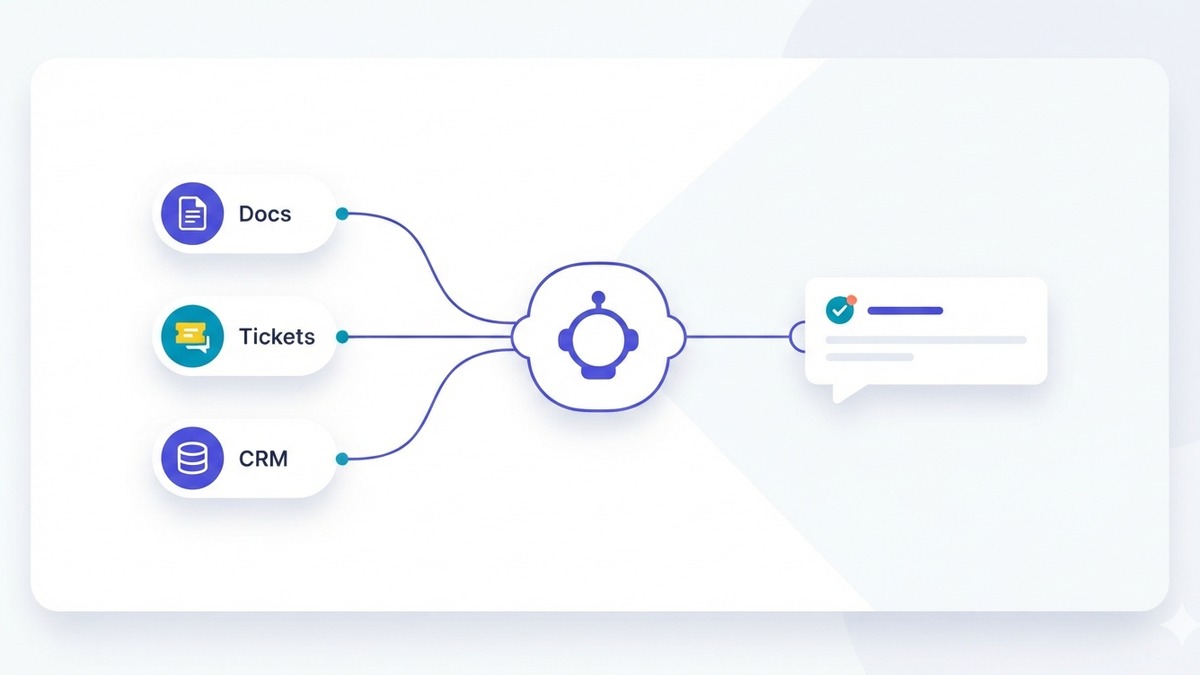
Artificial Wit takes a different approach. Connect your docs, tickets, and CRM once through a hosted MCP endpoint. Any client that speaks the Model Context Protocol — Claude, ChatGPT, Gemini, or an internal tool — can use the same grounded retrieval. You're not locked into whichever model the vendor picked. If you've already registered a ticketing API as an MCP tool, that setup carries over directly to how the support assistant calls it.
Additionally, this means the underlying model can change without your support team relearning a new interface or your IT team rebuilding an integration. Compared to closed, single-assistant platforms common in enterprise support tooling, model flexibility is a real architectural difference, not a marketing line. A team running a grounded AI support assistant on Claude today can test ChatGPT or Gemini next quarter against the exact same docs, tickets, and CRM data, without re-ingesting anything or rebuilding a single tool.
Getting Started With AI for Customer Support in Three Steps
Turning a fragmented support stack into a grounded AI assistant follows the same three-step pattern as any other Artificial Wit setup:
- Configure your sources. Ingest product docs, help center articles, and past resolved tickets into a knowledge base. Register your ticketing and CRM APIs as tools so the assistant can pull live data, not just static documents.
- Authenticate your client. Generate an API key to authenticate your MCP client against Artificial Wit's hosted endpoint, or connect via OAuth using your own Artificial Wit login instead.
- Connect your MCP client. Point Claude, ChatGPT, or your internal support tool at the endpoint, and grounded, cited answers are available immediately.
Free plans include up to three API connections and a 100 MB knowledge base, enough to connect a ticketing tool and a help center to test the mechanism before committing further. Pro plans add unlimited APIs and a 10 GB knowledge base for teams ready to connect their full stack, plus form, table, and chart-driven workflows for tickets and orders. See the full setup documentation for configuration detail.
Most teams don't need to migrate anything to get here. Your ticketing system and CRM stay exactly where they are. The knowledge base and MCP endpoint sit alongside them, not in place of them. That's the same "AI-enable, don't replace" pattern Artificial Wit applies to legacy ERPs and CRMs elsewhere, just scoped to the systems a support team touches every day.
FAQ
What does "AI for customer support" actually mean?
It means an AI assistant that answers support questions using your company's real docs, ticket history, and CRM data, retrieved and cited at answer time. That's different from a chatbot generating a response from general training data alone.
Can AI for customer support hallucinate on my company's data?
A general-purpose chatbot with no retrieval step can, and often does. A properly grounded assistant retrieves the actual source document before answering and attaches a citation, so agents can verify the answer instead of trusting it blindly.
Does AI for customer support replace human support agents?
No. It removes the tab-switching and manual lookup between docs, tickets, and CRM records, so agents answer faster with a verified source, not guess without one.
Can different support agents see different data through the same AI assistant?
Yes, if the platform uses permission-aware retrieval. The assistant only returns what the requesting agent already has access to, matching your existing access controls rather than introducing new ones.
Do I need to migrate my ticketing system or CRM to use AI for customer support?
No. Connecting an existing ticketing API or CRM as an MCP tool doesn't require moving data anywhere. The AI queries the live system through the registered tool.
How is this different from the chat widget on our website?
A customer-facing chat widget is one surface for AI support. This article covers the assistant your own support agents use internally, pulling from the same grounded sources, which is where most of the actual time savings happen.
Conclusion
AI for customer support only earns its place on a support team's desktop when it's grounded: every answer traced back to a real document, ticket, or CRM record an agent can verify in one click. That's the gap between the 64% of customers Gartner found distrust AI service and the 95% Zendesk found want to know why an AI reached its answer. Citations aren't a nice-to-have. They're the actual mechanism that closes both numbers at once.
Maybe your support team is still tabbing between a help center, a ticketing system, and three CRM fields nobody remembers the name of. Connecting them to one grounded assistant is the fastest fix available, not a multi-quarter platform migration. Sign up free and connect your first support source today, or explore how the same RAG mechanism grounds enterprise AI answers more broadly across the business — including retail order and inventory lookup and contract review with the same citation trail.
Related reading
Ready to put this into practice?
Talk to us about your stack